How to check your Google Maps ranking (and why your phone lies)
The LocalMapGrid team · Updated November 23, 2026 · 3 min read
The short answer
"Where do we rank on Google Maps?" sounds like a question with one answer. It isn't. A business has a different rank at every street corner, because Google weighs how close each business is to the person searching. Ask the question from the office and you get the best answer. Ask from across town and you might not find the business at all.
Why searching on your phone is misleading
- It's one location. Your phone reports where you are. Customers search from homes, offices and job sites spread across the area.
- It's personalised. Google uses your search history and the places you've visited. If you search for your own business often, you'll see it more.
- It's not repeatable. Search tomorrow from a slightly different spot and the result changes, so you can't tell whether your changes worked.
How geo-grid rank checking works
A geo-grid rank checker places a grid of evenly spaced points over the area around a business, for example 5 × 5 or 7 × 7, a few kilometres out in each direction. From each point it runs the same Google Maps search, as a new customer standing there would, and records where the business appears. The result is a heatmap: green where the business is in the top 3, red where it's buried or missing.
Here's a real one, a Dallas roofer checked for "roofing contractor" from 25 points:
How to read the heatmap
- Top 3 share. The share of points where the business is in the map pack. This is where most calls go, so it matters most.
- Visible share. The share of points where the business appears anywhere in the top 20. Low visibility means many customers never see it at all.
- Average position. Useful for tracking over time, but it hides the shape. Two businesses with the same average can have very different maps.
- The shape. Strong around the address and weak further out is normal. Weak even at the address means relevance or profile problems, not distance.
- Who wins where. The businesses taking the top 3 at each point are your real competitors, often not the ones you assumed.
Choosing grid size and radius
| Business | Grid | Radius |
|---|---|---|
| Dense city, walk-in (restaurant, dentist) | 5 × 5 or 7 × 7 | 1 to 2 km |
| Suburban service business (plumber, roofer) | 7 × 7 | 3 to 5 km |
| Metro-wide (injury lawyer, HVAC) | 9 × 9 | 5 km or more |
Bigger grids show more detail and cost more to run. A 7 × 7 grid is 49 separate Google Maps searches.
Check rankings in LocalMapGrid, step by step
- Open the free checker and enter the town or city.
- Find the business by its name on Google Maps.
- Type the search a customer would use, like "emergency plumber", not your brand name.
- Pick how far out to check and run the scan. It takes about a minute.
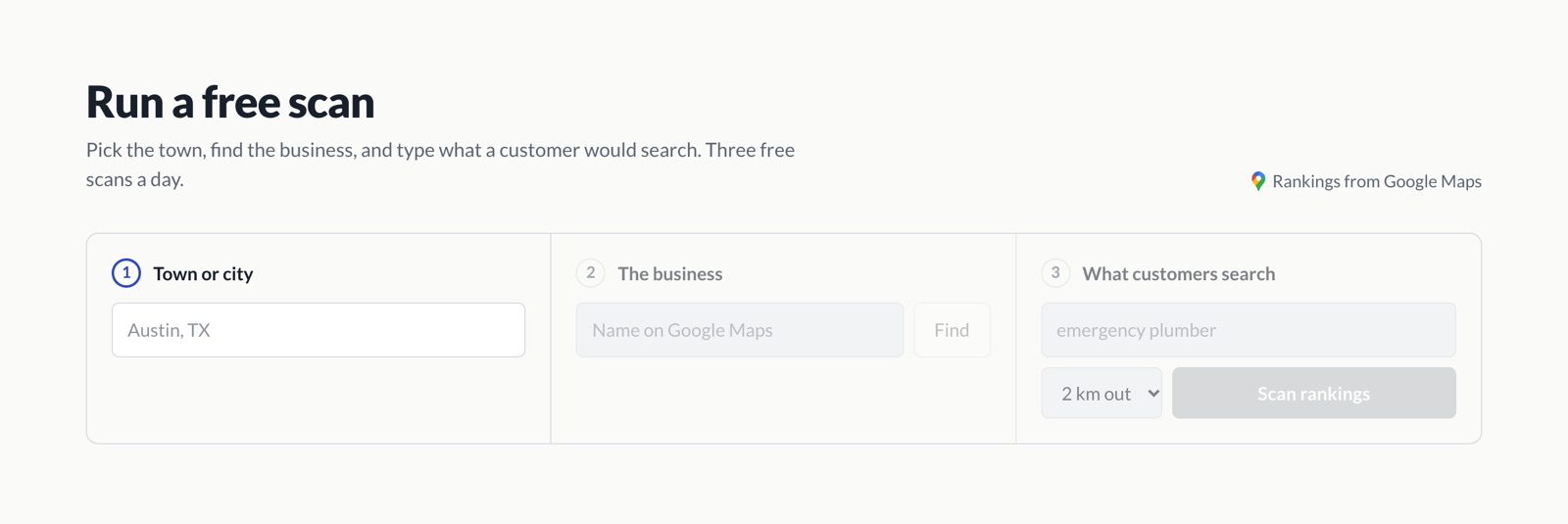
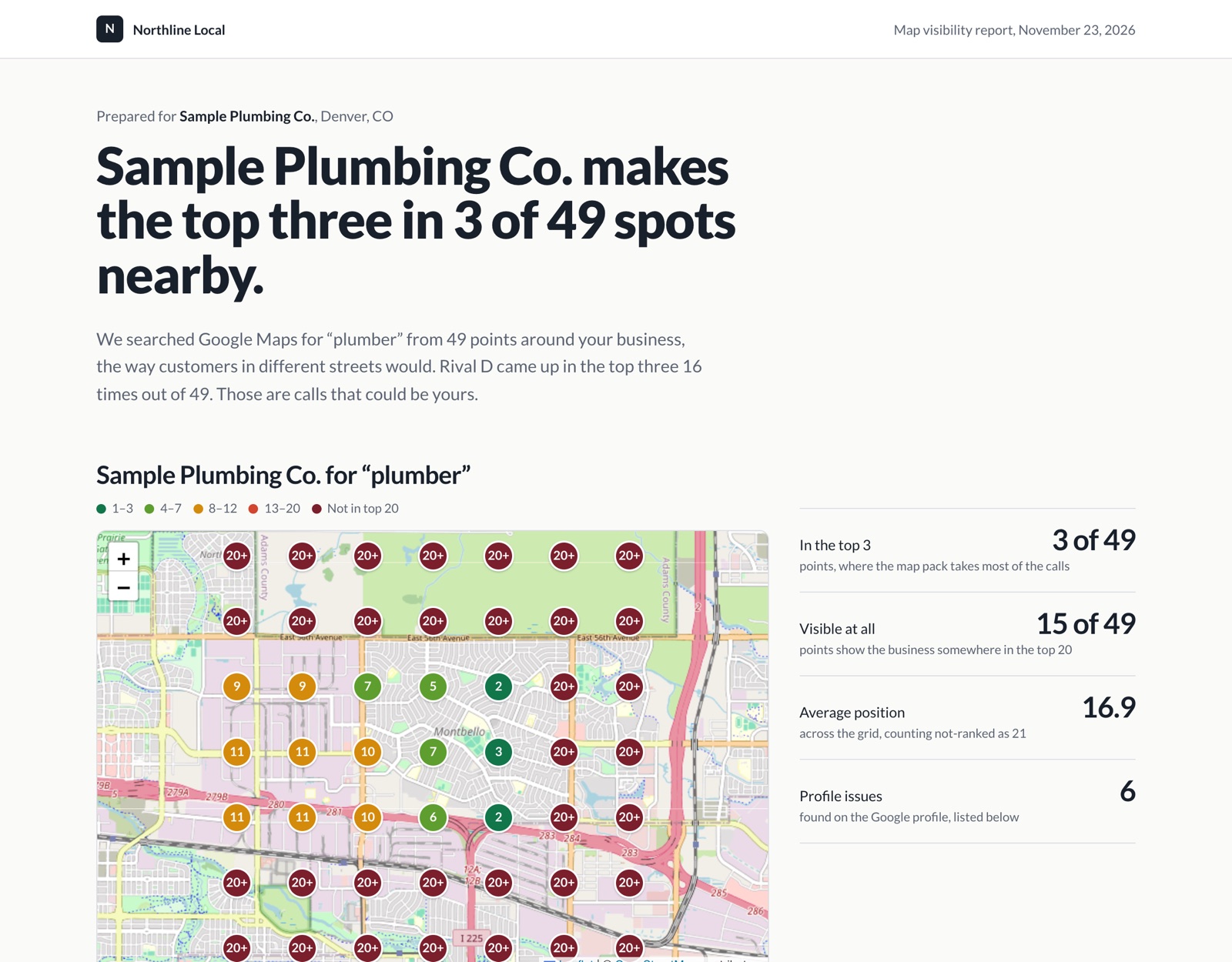
You get the heatmap, your top 3 and visible share, the businesses beating you, and a list of profile problems ordered by how much each one is likely holding you back.
What the numbers looked like in real scans
| Business | Grid | Top 3 | Visible | Avg. position |
|---|---|---|---|---|
| Denver plumber | 7 × 7 | 6% | 31% | 16.9 |
| Dallas roofer | 5 × 5 | 4% | 48% | 14.5 |
| Tampa law firm | 5 × 5 | 16% | 48% | 13 |
| Atlanta HVAC company | 5 × 5 | 20% | 48% | 13.2 |
All four had obvious profile problems, such as no website, an unclaimed profile or too few reviews, which is why they were picked from our prospect searches. "Average position" counts a missing result as 21.
For agencies: the heatmap is the pitch
A heatmap is the most persuasive thing you can show a local business owner. It's their own business, on a map of streets they know, with a competitor's name on the spots they're losing. That's why LocalMapGrid turns every scan into a shareable report page and tells you when the owner opens it.
Questions
What is a geo-grid rank tracker?
A tool that checks a business's Google Maps ranking from a grid of points around it, so you can see how the rank changes across the area instead of at one spot.
Is there a free Google Maps rank checker?
Yes. LocalMapGrid's free scan checks 25 points with live Google Maps data, three times a day, without an account.
How often should I check my Google Maps ranking?
Monthly is enough for most businesses. Rankings move daily, but changes from profile work take weeks to show.
Why is my Google Maps ranking different on my phone?
Your phone searches from your location and personalises results to your history. Customers elsewhere see something different.
What grid size should I use?
7 × 7 suits most service businesses. Use 5 × 5 for a quick check or a dense area, and 9 × 9 for metro-wide businesses.